Office Ergonomics Tips for a Healthier Workday
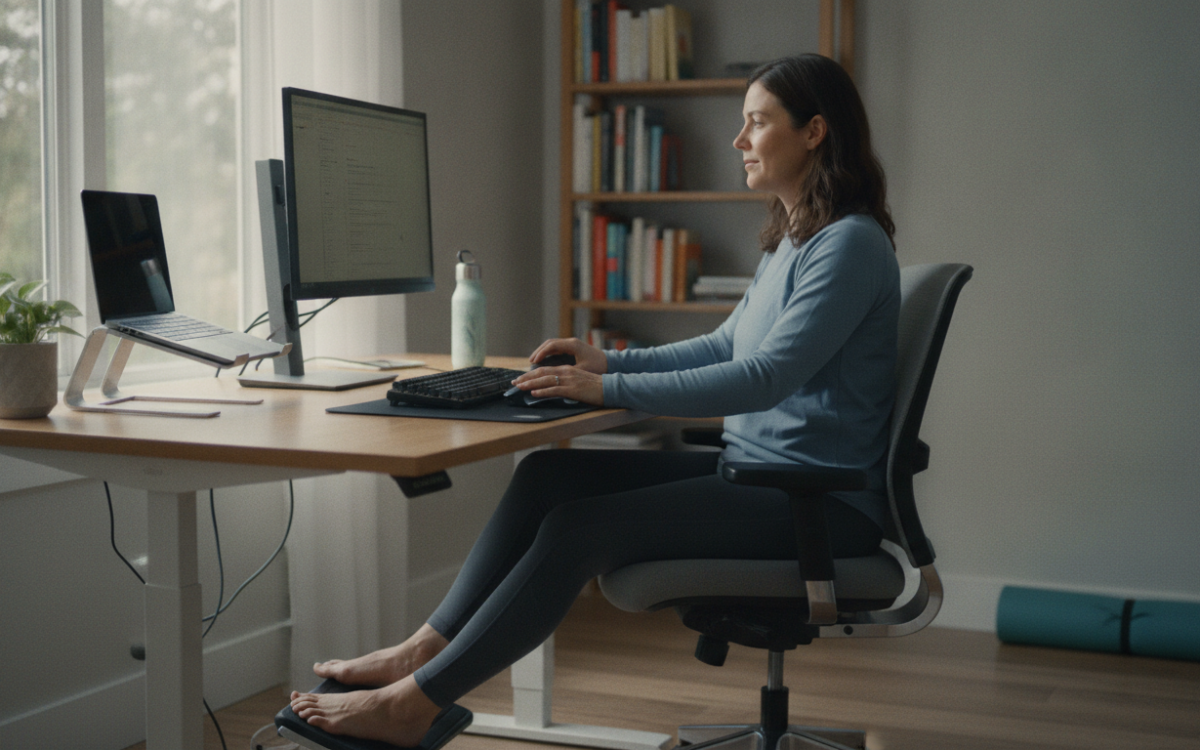
Quick answer: Office ergonomics is the practice of setting up your desk, chair, and screen to fit your body. Good office ergonomics lowers your risk of back pain, neck strain, and wrist injuries. It helps you sit better, move more, and feel less tired during a long workday.
Key Takeaways
- Office ergonomics fits your work space to your body, not the other way around.
- A screen at eye level and feet flat on the floor cut neck and back strain.
- Short breaks every 30 to 60 minutes keep muscles loose and reduce fatigue.
- Small changes, like a lumbar cushion, can prevent long term injury.
What is office ergonomics?
Office ergonomics is the way you set up your work space to fit your body. The goal is simple. You want less strain and more comfort while you work.
Many of us sit for hours at a desk. Over time, poor setups cause aches. Your neck stiffens. Your lower back hurts. Your wrists tingle. Good office ergonomics helps you avoid this.
It is not about fancy gear. It is about small, smart changes. For example, raising your screen or adjusting your chair can make a big difference.
Why does office ergonomics matter?
Office ergonomics matters because your body was not built to sit still all day. Bad posture adds up. It can lead to real injuries over time.
Repetitive strain and back pain are common at work. They cause missed days and lasting pain. However, most of these problems can be prevented. That is the power of good office ergonomics.
Also, comfort helps you focus. When you are not fighting a sore back, you get more done. You feel better at the end of the day too.
Common problems from a poor setup
- Neck and shoulder tension from a low screen.
- Lower back pain from a chair with no support.
- Wrist strain from a keyboard placed too high.
- Eye strain from a screen that is too close or too bright.
- Tired legs from a chair that is set too tall.
How do you set up an ergonomic workstation?
Start with your chair, then work outward. A good setup follows a few clear rules. You can adjust most of it in minutes.
First, sit back in your chair. Your feet should rest flat on the floor. Your knees should be about level with your hips. If your feet dangle, use a footrest.
Next, add support for your lower back. Many chairs have this built in. If not, a small cushion works well. This keeps the natural curve of your spine.
Screen, keyboard, and mouse
Place your screen at arm’s length. The top of the screen should be near eye level. This stops you from looking down all day.
Keep your keyboard low enough that your elbows bend at about 90 degrees. Your wrists should stay straight, not bent up or down. Put your mouse close to the keyboard so you do not reach.
These steps are the heart of office ergonomics. Small tweaks here save your neck and wrists over the years.
How often should you take breaks?
Take a short break every 30 to 60 minutes. Even a minute of movement helps a lot.
Stand up. Stretch your arms. Roll your shoulders. Walk to get water. Your muscles need this. Sitting too long slows blood flow and stiffens joints.
Try the 20-20-20 rule for your eyes. Every 20 minutes, look at something 20 feet away for 20 seconds. This eases eye strain from screens. For more on workplace health, see the CDC.
Simple stretches you can do at your desk
You do not need much room. A few gentle moves keep you loose.
- Tilt your head side to side to ease neck tension.
- Clasp your hands and reach toward the ceiling.
- Roll your shoulders back in slow circles.
- Stretch your wrists by gently pulling back your fingers.
Does office ergonomics work if you use a laptop?
Yes, but laptops need extra care. The screen and keyboard are joined, so one is always in a poor spot.
The fix is easy. Raise the laptop on a stand so the screen sits at eye level. Then use a separate keyboard and mouse. This gives you the best of both.
If you work from home, the same office ergonomics rules apply. Avoid the couch or bed for long tasks. A real desk and chair protect your body much better.
Small habits that help every day
Good office ergonomics is more than one setup. It is a set of daily habits. Keep your posture in mind. Sit tall. Keep both feet down.
Also, drink water and move often. Keep your desk tidy so you do not twist or reach. Adjust your setup as needed, because comfort can change day to day.
Over time, these habits become second nature. Your body will thank you. You will notice fewer aches and more energy.
Ready to feel better at work? Start with one change today. Raise your screen or fix your chair. Then build from there. If you have ongoing pain or numbness, talk to a doctor before it gets worse.
Frequently Asked Questions
What is the correct sitting posture at a desk?
Sit back with your spine supported and both feet flat on the floor. Keep your knees near hip level. Your elbows should bend at about 90 degrees. Your screen top should sit near eye level. This posture is the core of good office ergonomics and reduces strain.
How high should my computer screen be?
The top of your screen should be at or just below eye level. Keep it about an arm's length away. This stops you from looking down or leaning forward, which strains your neck and shoulders over a long workday.
Can office ergonomics prevent back pain?
Yes, good office ergonomics can lower your risk of back pain. A supportive chair, correct screen height, and regular breaks keep your spine in a healthy position. However, if pain is severe or lasting, you should see a doctor for proper care.
How often should I stand up while working?
Aim to stand or move every 30 to 60 minutes. Even one minute of stretching or walking helps blood flow and eases stiff muscles. Long stretches of sitting are hard on your body, so short breaks make a real difference.
Do I need to buy expensive equipment?
No. Many office ergonomics fixes are free or cheap. You can raise your screen with books, use a rolled towel for back support, and move your keyboard closer. Small changes often matter more than costly gear.
For more, see our Health & Wellness articles.
This article is for general information only. It is not medical advice. Talk to your doctor before you make changes to your health routine.